#!/usr/bin/python
# -*- coding: UTF-8 -*-

from cmath import log
from ftplib import FTP
import os
import sys
import time
import socket
import subprocess

class MyFTP:
    """
        FTP automatic download and upload script, can operate recursively on directories
        Author: Ouyang Peng
        Blog address: http://blog.csdn.net/ouyang_peng/article/details/79271113
    """

    def __init__(self, host, port=21):
        """ Initialize FTP client
        Parameters:
                 host: IP address
                 port: Port number
        """
        # print("__init__()---> host = %s ,port = %s" % (host, port))

        self.host = host
        self.port = port
        self.ftp = FTP()
        # Reset encoding method
        #self.ftp.encoding = 'gbk'
        self.ftp.encoding = 'utf8'
        # Get script path
        path = os.path.dirname(os.path.realpath(__file__))
        # self.log_file = open(path + "/log.txt", "a", encoding='utf-8')
        self.file_list = []

    def login(self, username, password):
        """ Initialize FTP client
            Parameters:
                  username: Username
                  password: Password
            """
        try:
            timeout = 60
            socket.setdefaulttimeout(timeout)
            # 0 active mode 1 passive mode
            self.ftp.set_pasv(True)
            # Open debug level 2 to show detailed information
            # self.ftp.set_debuglevel(2)

            self.debug_print('Starting to connect to %s' % self.host)
            self.ftp.connect(self.host, self.port)
            self.debug_print('Successfully connected to %s' % self.host)

            self.debug_print('Starting to log in to %s' % self.host)
            self.ftp.login(username, password)
            self.debug_print('Successfully logged in to %s' % self.host)

            self.debug_print(self.ftp.welcome)
        except Exception as err:
            self.deal_error("FTP connection or login failed, error description: %s" % err)
            pass

    def is_same_size(self, local_file, remote_file):
        """ Check if the sizes of the remote file and local file are the same

           Parameters:
             local_file: Local file
             remote_file: Remote file
        """
        try:
            remote_file_size = self.ftp.size(remote_file)
        except Exception as err:
            # self.debug_print("is_same_size() error description: %s" % err)
            remote_file_size = -1

        try:
            local_file_size = os.path.getsize(local_file)
        except Exception as err:
            # self.debug_print("is_same_size() error description: %s" % err)
            local_file_size = -1

        self.debug_print('local_file_size:%d  , remote_file_size:%d' % (local_file_size, remote_file_size))
        if remote_file_size == local_file_size:
            return 1
        else:
            return 0

    def download_file(self, local_file, remote_file):
        """ Download file from FTP
            Parameters:
                local_file: Local file
                remote_file: Remote file
        """
        self.debug_print("download_file()---> local_path = %s ,remote_path = %s" % (local_file, remote_file))

        if self.is_same_size(local_file, remote_file):
            self.debug_print('%s file sizes are the same, no need to download' % local_file)
            return
        else:
            try:
                self.debug_print('>>>>>>>>>>>> Downloading file %s ... ...' % local_file)
                buf_size = 1024
                file_handler = open(local_file, 'wb')
                self.ftp.retrbinary('RETR %s' % remote_file, file_handler.write, buf_size)
                file_handler.close()
            except Exception as err:
                self.debug_print('Error downloading file, exception: %s ' % err)
                return

    def download_file_tree(self, local_path, remote_path):
        """ Download multiple files from a remote directory to a local directory
                       Parameters:
                         local_path: Local path
                         remote_path: Remote path
                """
        print("download_file_tree()--->  local_path = %s ,remote_path = %s" % (local_path, remote_path))
        try:
            self.ftp.cwd(remote_path)
        except Exception as err:
            self.debug_print('Remote directory %s does not exist, continuing...' % remote_path + " ,specific error description: %s" % err)
            return

        if not os.path.isdir(local_path):
            self.debug_print('Local directory %s does not exist, creating local directory' % local_path)
            os.makedirs(local_path)

        self.debug_print('Switched to directory: %s' % self.ftp.pwd())

        self.file_list = []
        # Method callback
        self.ftp.dir(self.get_file_list)

        remote_names = self.file_list
        self.debug_print('Remote directory list: %s' % remote_names)
        for item in remote_names:
            file_type = item[0]
            file_name = item[1]
            local = os.path.join(local_path, file_name)
            if file_type == 'd':
                print("download_file_tree()---> Downloading directory: %s" % file_name)
                self.download_file_tree(local, file_name)
            elif file_type == '-':
                print("download_file()---> Downloading file: %s" % file_name)
                self.download_file(local, file_name)
        self.ftp.cwd("..")
        self.debug_print('Returned to upper directory %s' % self.ftp.pwd())
        return True

    def upload_file(self, local_file, remote_file):
        """ Upload file from local to FTP

           Parameters:
             local_path: Local file
             remote_path: Remote file
        """
        if not os.path.isfile(local_file):
            self.debug_print('%s does not exist' % local_file)
            return

        if self.is_same_size(local_file, remote_file):
            self.debug_print('Skipping equal file: %s' % local_file)
            return

        buf_size = 1024
        file_handler = open(local_file, 'rb')
        self.ftp.storbinary('STOR %s' % remote_file, file_handler, buf_size)
        file_handler.close()
        self.debug_print('Uploaded: %s' % local_file + " successfully!")

    def upload_file_tree(self, local_path, remote_path):
        """ Upload multiple files from a local directory to FTP
           Parameters:

             local_path: Local path
             remote_path: Remote path
        """
        if not os.path.isdir(local_path):
            self.debug_print('Local directory %s does not exist' % local_path)
            return

        self.ftp.cwd(remote_path)
        self.debug_print('Switched to remote directory: %s' % self.ftp.pwd())

        local_name_list = os.listdir(local_path)
        for local_name in local_name_list:
            src = os.path.join(local_path, local_name)
            if os.path.isdir(src):
                try:
                    self.ftp.mkd(local_name)
                except Exception as err:
                    self.debug_print("Directory already exists %s ,specific error description: %s" % (local_name, err))
                self.debug_print("upload_file_tree()---> Uploading directory: %s" % local_name)
                self.upload_file_tree(src, local_name)
            else:
                self.debug_print("upload_file_tree()---> Uploading file: %s" % local_name)
                self.upload_file(src, local_name)
        self.ftp.cwd("..")

    def close(self):
        """ Exit FTP
        """
        self.debug_print("close()---> Exiting FTP")
        self.ftp.quit()
        # self.log_file.close()

    def debug_print(self, s):
        """ Print log
        """
        self.write_log(s)

    def deal_error(self, e):
        """ Handle error exceptions
            Parameters:
                e: Exception
        """
        log_str = 'An error occurred: %s' % e
        self.write_log(log_str)
        sys.exit()

    def write_log(self, log_str):
        """ Record log
            Parameters:
                log_str: Log
        """
        time_now = time.localtime()
        date_now = time.strftime('%Y-%m-%d', time_now)
        format_log_str = "%s ---> %s \n " % (date_now, log_str)
        print(format_log_str)
        # self.log_file.write(format_log_str)

    def get_file_list(self, line):
        """ Get file list
            Parameters:
                line:
        """
        file_arr = self.get_file_name(line)
        # Remove . and ..
        if file_arr[1] not in ['.', '..']:
            self.file_list.append(file_arr)

    def get_file_name(self, line):
        """ Get file name
            Parameters:
                line:
        """
        pos = line.rfind(':')
        while (line[pos] != ' '):
            pos += 1
        while (line[pos] == ' '):
            pos += 1
        file_arr = [line[0], line[pos:]]
        return file_arr


if __name__ == "__main__":
    # Clear logs
    path = os.path.dirname(os.path.realpath(__file__))      # Script path
    # if os.path.exists(path + '/log.txt'):
    #     log_file = path + '/log.txt 'if os.sep == "/" else path + '\\' + 'log.txt'
    #     subprocess.Popen(f'rm -rf {log_file}', shell=True)
    #     time.sleep(1)

    # Get Actions Secrets constants
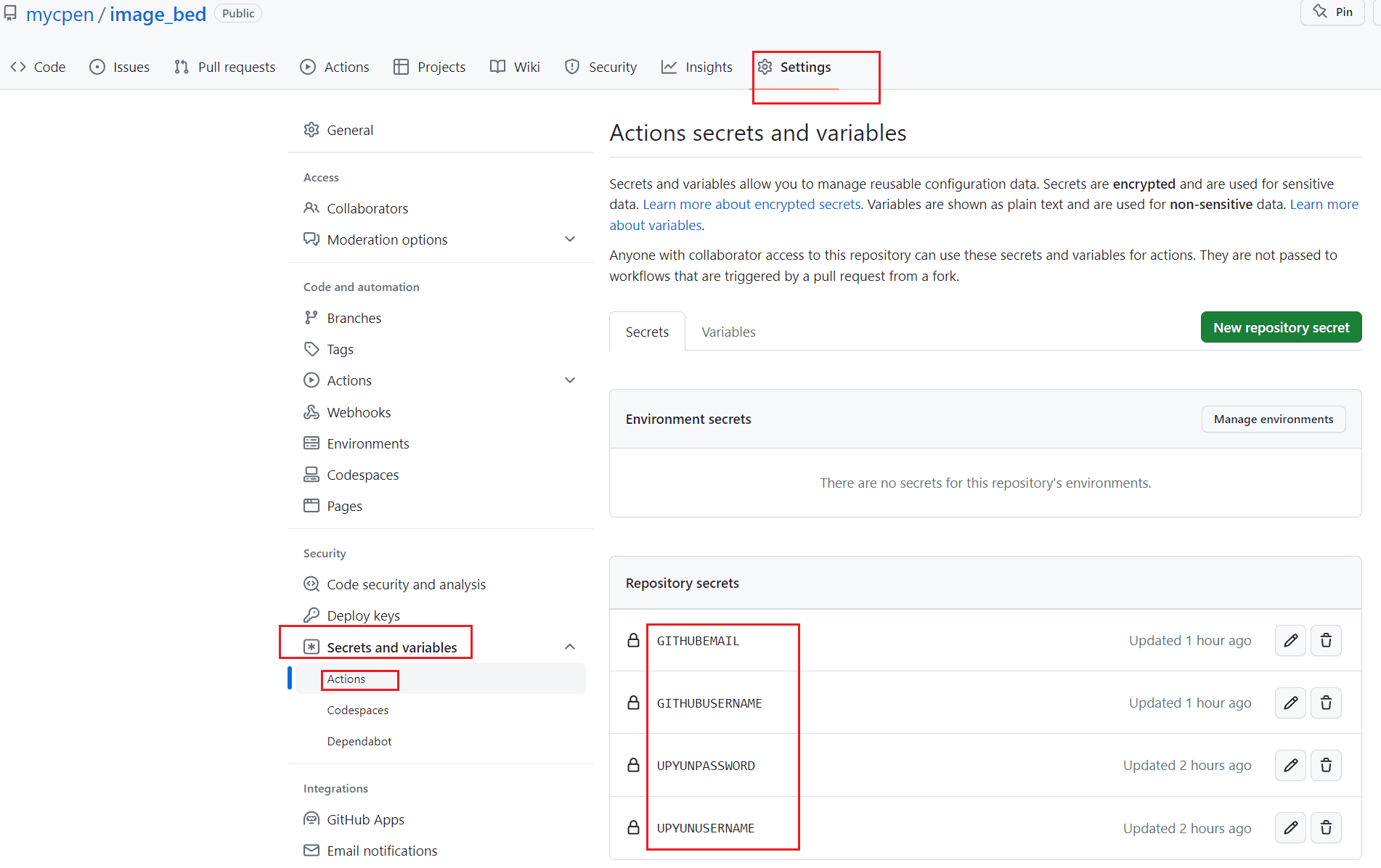
    upyunUsername = os.environ["UPYUNUSERNAME"]
    upyunPassword = os.environ["UPYUNPASSWORD"]

    my_ftp = MyFTP("v0.ftp.upyun.com")
    my_ftp.login(upyunUsername, upyunPassword)

    # Download directory
    # Upyun cloud storage → Local image/
    if os.sep == "\\":      # Windows
        pass
    elif os.sep == "/":     # Unix
        my_ftp.download_file_tree("image/", "/image/")  # image/ repository directory; /image/ Upyun cloud storage directory

    # Upload directory
    # Local image/ → Upyun cloud storage
    if os.sep == "\\":
        pass
    elif os.sep == "/":
        my_ftp.upload_file_tree("image/", "/image/")  # image/ repository directory; /image/ Upyun cloud storage directory
        my_ftp.close()